Как выбрать видеопроектор в 2026 году: от бюджета до домашнего кинотеатра
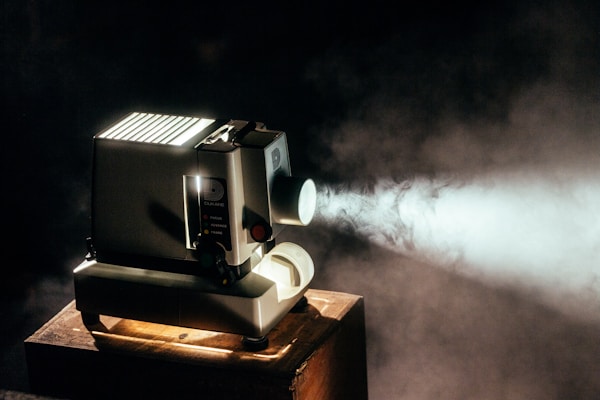
Хороший видеопроектор может превратить любую стену в киноэкран. Вот всё, что нужно знать, чтобы выбрать правильный — от разрешения до яркости.
Почему проектор может быть лучше телевизора
Большие телевизоры стали доступнее, но проектор всё ещё даёт то, чего не может ни один ТВ: по-настоящему кинематографичное изображение за малую долю цены за квадратный дюйм. Телевизор на 120 дюймов стоит тысячи евро и весит столько, что требует профессионального крепления на стену. Проектор с таким же размером изображения стоит малую часть этой цены и устанавливается на журнальный столик или кронштейн под потолком. Для киноманов, любителей спорта и геймеров, которым нужен масштаб, недоступный телевизору, проектор — логичный выбор.
Разрешение: что вам действительно нужно
Разрешение проектора определяет чёткость изображения:
- 1080p (Full HD): Золотая середина для большинства гостиных. С расстояния просмотра от 3 метров разница с 4K минимальна. Отличное соотношение цена/качество.
- 4K (UHD): Становится заметным на экранах более 100 дюймов или если вы сидите ближе 2,5 метра. Нативные 4K-проекторы используют технологию сдвига пикселей для достижения настоящего разрешения 4K.
- 720p (HD): Подходит только для небольших экранов или бюджетных конфигураций. Для домашнего кинотеатра стоит избегать.
Яркость: самая важная характеристика
Яркость измеряется в ANSI-люменах, и это самая критичная характеристика проектора:
- 500–1000 люмен: Подходит только для полностью затемнённого помещения. Бюджетные модели этого диапазона справляются с редкими кинопросмотрами при закрытых шторах.
- 1000–2500 люмен: Разумно справляется с фоновым светом. Хорошо для гостиных, где нельзя добиться полной темноты.
- 2500–4000 люмен: Достаточно ярко для дневного просмотра в умеренно освещённых помещениях без плотных штор.
- 4000+ люмен: Разработано для больших переговорных залов или помещений со значительным фоновым освещением.
Золотое правило: всегда закладывайте запас по яркости. Слишком слабый для вашего окружения проектор даст выцветшую и неприятную картинку, какими бы ни были его разрешение и цветопередача.
Проекционное расстояние и размещение
Проекционное расстояние — это дистанция между проектором и экраном. Понимание этой величины необходимо, чтобы выбрать проектор, подходящий для вашей комнаты:
- Стандартная проекция (2,0–3,0:1): Требует 2–3 метра расстояния для 100-дюймового экрана. Нужна большая комната или крепление на потолке сзади.
- Короткий фокус (0,5–1,5:1): Даёт 100-дюймовый экран с 1–1,5 метра. Отлично для небольших комнат или установки на полке рядом с экраном.
- Ультракороткий фокус (UST) (менее 0,3:1): Устанавливается в нескольких сантиметрах от экрана или стены. Устраняет проблемы с тенями и освобождает всю комнату.
Наши лучшие выборы
Лучший для домашнего кинотеатра в целом: BenQ TK700STi даёт настоящее разрешение 4K при 3200 люмен с коротким фокусом, заполняющим 100-дюймовый экран с 2,1 метра. Он поддерживает Android TV и Apple AirPlay, а обработка HDR-PRO обеспечивает яркие цвета даже в хорошо освещённых помещениях.
Лучший бюджетный: XGIMI MoGo 2 предлагает разрешение 1080p при 400 ANSI-люменах в компактном портативном корпусе со встроенным Android TV. Идеален для кинопросмотров в спальне или уличных показов тёплыми вечерами.
Лучший лазерный UST: Hisense PX3-PRO использует тройной лазерный источник света, выдающий более 2500 люмен всего с 15 сантиметров от стены. Он создаёт 100-дюймовое изображение, конкурирующее с качеством премиального OLED-телевизора, за малую долю размера и стоимости за дюйм.
Дополнительные функции, на которые стоит обратить внимание
Автоматическая коррекция трапеции: Автоматически выравнивает форму изображения, когда проектор установлен не идеально по центру. Незаменима, если вы не можете разместить проектор прямо перед экраном.
Встроенные динамики: Большинство встроенных динамиков проекторов посредственны. Планируйте подключение внешних колонок или саундбара для полноценного киноопыта.
Входная задержка для игр: Если вы собираетесь играть на проекторе, ищите задержку входа ниже 20 миллисекунд в игровом режиме. Более высокие значения дают заметную задержку между нажатием на геймпаде и действием на экране.
Установка проектора
Начните с определения идеального размера экрана для вашей комнаты, рассчитав проекционное расстояние для выбранного проектора. Установите или разместите проектор на правильном расстоянии, затем настройте фокус и трапецию. Для наилучшего опыта вложитесь в экран ALR (с отражением от фонового света), который минимизирует блики от окон и освещения комнаты. Простая белая стена подойдёт при необходимости, но специальный экран даёт лучшую однородность цвета и яркости.
Итог
Видеопроектор — одно из самых впечатляющих улучшений, которые можно внести в вашу развлекательную систему. Технология значительно продвинулась за последние годы: ярче источники света, чётче разрешение и умнее функции, облегчающие установку. Хотите ли вы портативный проектор для походов или стационарный домашний кинотеатр, правильный проектор дарит опыт, который не может повторить ни один телевизор. Смотрите наши полные руководства по покупке для дополнительных рекомендаций по домашним развлечениям.
🔍 Data sources
Editorial conclusions are drafted by the DealMaxa team from these documented specifications and aggregated buyer reviews. No brand can pay for a better placement. Our methodology · Price transparency